Canvas is one of the most popular LMSs out there. Many Trinket users use Canvas to teach, so I thought I’d write a little guide about how to add interactive coding exercises to your Pages, Quizes, and Assignments with our embeddable Python Trinkets..
Interactive Code on Canvas in 3 Steps
Putting an interactive Trinket on a Canvas page is simple:
Is it crazy to ask teachers to take time out of their hard-earned weekends to learn to code? Probably, but when we do they’re saying ‘yes.’
Teaching code is easier than you think.
On August 9th, Trinket is helping to organize an event to get Middle and High School teachers prepared to teach an Hour of Code this fall. We weren’t sure if anyone would be interested but the meetup event is full with a waitlist! I’ll summarize what we learn from the experience in another post. For now, I’d like to talk about how you can organize a similar event.
There are three main steps that anyone can take to organize a coding event for teachers.
1 – Find a Venue
The most important step is to get a venue and date. If you have a school or university that will let you reserve a room, you have a leg up! The second most important thing is what day and time to hold the event. Think about events you’ve been to in the past and when they were in the week. We chose a Saturday at 11 A.M. for our workshop, thinking that would be the most likely to be free. We also found a sponsor to provide lunch, but don’t be shy about charging $5 to provide lunch.
2 – Find an Instructor
An instructor is, believe it or not, optional. It’s much more important to have someone who’s taught kids in your target age group than someone who knows a lot about programming. As computer science teacher Rebecca Dovi has written, “A good teacher can teach computer science. Not all computer scientists can teach.” Ideally if you have an instructor they will lead you through an activity the way they would a group of students, and then leave time for Q&A.
If you choose not to have an instructor, a roundtable style event can be just as enlightening, if not more so! In my experience, many teachers are already trying coding out in the classroom. Sharing ideas and stories of what has worked can help everyone feel more comfortable and be more successful in the classroom. I’ve even talked to teachers who regularly meet in informal self-study groups, going through Coursera or Codecademy classes together. Get creative!
3 – Get Hands On!
Whatever event style you choose, avoid Death By Powerpoint! Coding education has to be hands on, and teacher events are no exception. Whether it’s playing around with MIT’s Scratch drag-and-drop programs, or putting your first interactive Trinket on your class website, attendees should get a first person experience of the tools. This will help them visualize what a class session would be like and, ultimately, have a more successful first classroom coding experience.
These three steps are easier said than done but they take diligence and persistence, not specialized coding knowledge.
Aim for Success
Coding is just like any new topic or technique- try it out in small bits and build on what works. Code.org’s Hour of Code initiative is genius for just this reason: the message is start with one hour long lesson. The Code in the Classroom event we’re helping organize has just this goal and I hope you’ll consider attending or organizing a similar event in your area!
The materials I’ll use to teach the workshop are here. If you want to add your own interactive examples to your teacher coding event website, check out trinket.io. As always, you can find me on Twitter or via email if you have any questions. If you’re interested in having me teach a free workshop at your school or university, let’s talk. I love helping out!
Over the past few weeks we have heard from you just how effective interactive trinkets can be for teaching programming to their students. Even though it takes a few steps to create and embed trinkets we have seen thousands created and hundreds installed in websites around the world. You’ve helped us realize that interactive examples that can go anywhere are the future of hands-on teaching.
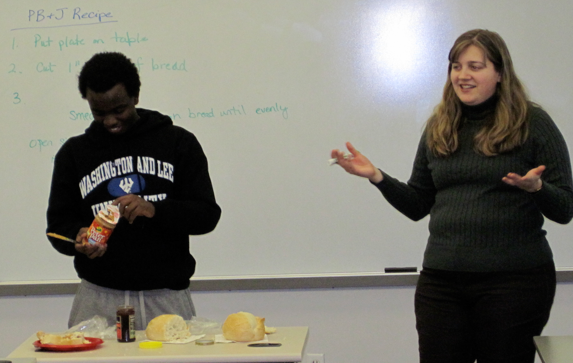
An effective and time-honored technique for introducing teaching algorithmic thinking to a class is to make a peanut butter and jelly sandwich.
No, I’m not joking. Here’s proof: a university computer science class making a sandwich.
Prof. Sara Sprenkle of Washington and Lee University leading her class though the time-honored PBJ Algorithm example.
As humans, making a sandwich is easy. For computers (robots, at least), it can also be easy – given the right instructions. Leading the class through making a sandwich with one student as “Computer” can give students a sense of how literal computers are. Seeing a student poke through the foil on the jar of peanut butter with a knife because there were no instructions to remove it is a visual experience that they’ll be able to remember when programs inevitably do something unexpected.
In a previous post, I talked about how Trinkets can turn Google Sites into an interactive tool for teaching Python. By popular demand, here’s a step-by-step guide to adding a Trinket to your Google Site. Happy teaching!
Adding an interactive Trinket to any Google Site is easy. Just follow these three steps: