Brad Miller and the search for interactive teaching tools

Luther College computer science professor Brad Miller is a true innovator and one of our inspirations here at Trinket.  He’s the core maintainer for the Skulpt project, which we use in our Python trinkets, and has built one of the best free online computer science textbook collections around at interactivepython.org.  

In this interview, we hear about how he got into teaching, his search for better, more interactive resources, and how he uses interactive tools (many of which he created!) in his own classroom.  One of the themes that comes through is how his projects, like all software projects, are embedded within communities of contributors working to solve shared problems.  We’re excited and honored to be a part of some of the exciting work he’s doing!

This talk with Brad is one of a series of periodic interviews we do of educational innovators.  Other interviews in the series can be found here.

Prof. Brad Miller

Elliott: You’re doing some awesome things in the classroom, and I’m looking forward to learning more about that. But let’s start with how you got here. Can you give us a sense of your teaching history? How were your first classes different from what you’re doing now?

Brad: I feel sorry for my first students. I had spent 18 years in industry as a programmer and entrepreneur, so when I returned to academia and started teaching I recall that I had to make a lot of adjustments in terms of my own expectations about what students knew and didn’t know and what they were capable of doing. Aside from gradually making my classes easier I have moved from a lecture centric style of teaching to an active style of teaching. I find that I’m much more effective when I can be coaching the students through activities rather than lecturing. Now I rarely lecture for more than a few minutes before I have them working on something.
Continue reading

New Trinket Enhancements

Over the past weeks, a rapidly growing number of people from all over the world have been using trinkets to enhance their teaching experience. As a result, we have received some great feedback from our users and are proud to announce some exciting enhancements to our embeddable trinkets.  Read on for details and some screenshots!

Saving A Copy

A few months ago we added the My Trinkets feature (read more about it here) which allowed registered users to manage a library of their trinkets. This was great for users that built trinkets from scratch, however it didn’t really provide an easy way to grab a copy of someones elses trinket embedded on another site. That is why today we are announcing the ability to quickly add any trinket you find in the wild to your own My Trinkets collection.

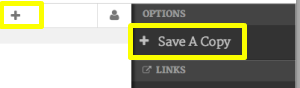
How does it work? Simply find a trinket you like, click the + icon on the trinket topbar or open the user menu on the right side of the trinket and choose the Save A Copy option.


There are two ways to copy trinkets you see to your account.

Along with this feature we added the ability to create an account or sign in from within any embedded trinket. Once signed in, you will be able to add that trinket to your own My Trinkets collection!

Continue reading

We Should Teach Code like We Teach Languages

There’s been a movement afoot at all levels to get computer languages treated like foreign languages for curriculum purposes.  This is in part a strategy of how to get computer science topics to count in education of various levels, which is an important question.

But there’s a deeper insight here that I think most people miss.  Code is a human language. We invented it!  Yes, code tells computers what to do but it’s also how we communicate with each other about computers doing things.  This has huge implications for teaching it and the kinds of tools we need to do so effectively.

Programming Languages are Human Languages.

Continue reading

Walt Gurley is teaching code at a science museum

Our interactive Python trinkets were designed to be used in the classroom but users are finding many other creative ways to use them!  In this interview, Walt Gurley of the Visual World Investigate Lab (VisLab) at the North Carolina Museum of Natural Sciences shares his way of teaching programming and creative thinking in the context of a hands-on lab.

This is part of a periodic series of interviews we’re doing of educational innovators.  An archive of previous interviews can be found here.

Walt Gurley of the NC Museum of Natural Sciences

Elliott: When did you start teaching programming? What got you into it?

Walt: I started teaching program approximately a year and a half ago, shortly after coming to work at the Visual World Investigate Lab (VisLab) at the NC Museum of Natural Sciences. The VisLab focuses on data visualization and the technologies that help us understand the sometimes complex world around us. A key component of these technologies is computer programming. Given the ubiquity and power of programming in modern scientific studies and society in general, I decided to develop classes for school groups and the general public that introduce basic computer programming concepts.

I am kind of a late bloomer when it comes to programming. Apart from going through the DOS commands to install some computer games or copying and pasting some HTML to make websites as a kid I was pretty much just a computer user.

Continue reading

Mike Molony is Solving Project Euler, Interactively

Our interactive Python trinkets were designed to be used in the classroom but users are finding many other creative ways to use them!  In this interview, Mike Molony describes how he’s been steadily working his way through Project Euler, a set of mathematical programming challenges, and blogging his interactive solutions using Trinket.  Enjoy!  

This is part of a periodic series of interviews we’re doing of educational innovators.  An archive of previous interviews can be found here.

Mike Molony

Elliott: Your blog has over 130 Python solutions (and counting!) to the 470+ Project Euler Problems listed on projecteuler.net. Could you briefly explain the Project and describe what inspired you to start blogging your way through it?

Mike: Project Euler (www.projecteuler.net) is a fantastic resource that provides problems, mostly with a mathematical tone, that helps teach you programming by solving problems. It wasn’t long before I discovered that most submitted solutions were 50-200 lines of code and took hours to execute. I wanted a forum that shared solutions taking fewer than 15 lines of Python and running in a fraction of a second. And, as I had hoped, I get many comments on how to improve my solutions even further. So, blogging my solutions has been a learning experience for me also.

Continue reading