I recently finished a series of three posts (here, here, and here) on how my background in Art History has influenced my teaching. Now I’m moving on to why I think Python is an excellent first choice of language for teens and adults.
What are characteristics of a great first programming language? Another way to phrase that question is “What is it we owe our students when we teach them to code?” For adult and teen students, I think there are five key things.
5 things students need from a 1st language:
- A great experience on Day 1. Much like the first page of a book, students need to be ‘hooked’ early on to have the excitement and curiosity to persevere in the face of the inevitable frustrations of learning something new. This can be especially important for those who haven’t been exposed to programming from a young age.
- The ability to (eventually) program on the Web. Increasingly, the Web is critical to the profession and craft of programming and students should have Web frameworks available when they’re ready.
- The ability to program desktop applications. While trends are moving more of what we do onto the web, there’s nothing like the immediacy of making and running your first local program.
- An eventually marketable professional skill. While academic or recreational programming is excellent, the skills we teach should also be usable in a professional context should students choose to use them in that way.
- A supportive and welcoming community surrounding the language. Once again this is crucial for those who haven’t had exposure to coding from a young age.
Other instructors or students might disagree on the correct desiderata for a first programming language. But in my opinion and experience there’s no language that excels on these five counts like Python does.
1. A great first experience
The traditional first program a user writes is something that prints the words ‘Hello World’. There are many other components to a successful first experience, but Python’s ‘Hello World’ is amongst the simplest of any language. Students can simply type this into the Python interpreter and press enter:
This example is interactive – try it yourself!
Python’s focus on readability makes it an excellent choice, especially when compared with languages like Java that have verbose and conspicuous syntax:
public class HelloWorld {

    public static void main(String[] args) {
        System.out.println("Hello, World");
    }

}
After writing the program above, students must compile it and run it on the command line. The inevitable hiccups in doing so can convince students that programming is too hard for them. Students who typed in print("Hello World") and pressed enter, meanwhile, are ready and have the confidence to learn more.
2. Web programming
Python is at home on the web, unlike a low-level language like C. Frameworks like Django, Pyramid, and Flask give students the ability to create real web applications that have the same power as the sites they use every day. Flask is my personal favorite for teaching because, in combination with a free Heroku account, students can have their own Simple blog deployed in under an hour. And adding their first route to a web app is simple as well:
@app.route("/about")
def about():
    return render_template("about.html", now=datetime.datetime.now())
This code isn’t trivial but is readable by students after only a few sessions. Knowing how to route web applications in even the most basic way is a huge step forward in terms of confidence and curiosity. Read more about the Simple blog and how to teach with it here.
3. Desktop applications
Languages like PHP or Javascript that are designed for the Web limit students to web development, while Python is also at home on local machines. Pygame, wxPython, and other libraries for windowed programs let students explore building and running their own desktop apps. Katie Cunningham has written what I’d consider to be the definitive guide on teaching with Pygame. I’ve used Pygame to teach teens and graduate students and it’s tons of fun. Here’s a game called Starpusher I’d recommend for teaching:
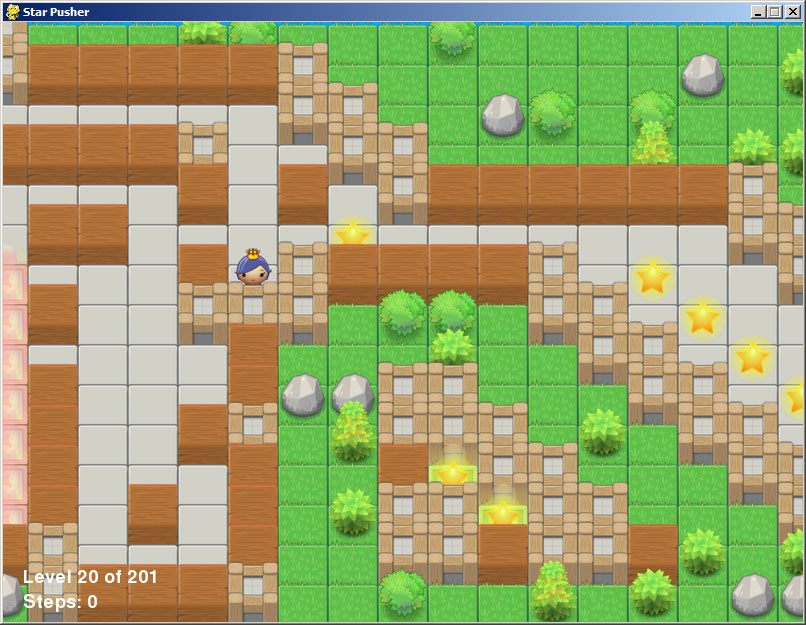
The game is available from pygame.org here or I’ve included it in a Github repo here. It also comes pre-installed on Raspberry Pis.
4. Professional skill
Unlike teaching languages like Scratch or Logo, Python is used extensively in the professional and academic communities. It’s a language that students can both start with and grow into. Students who need to go lower level will find a tight integration with C. Students who want to explore another high level language like Ruby will find the transition smooth. Students who want to take tighter control of their Web applications will find that Javascript skills mesh nicely with Python Web frameworks. And students who want to explore paradigms like Functional Programming will find they can do so without learning a new language.
Most importantly, though, students who have a good experience with programming from the start will have the dedication and curiosity to evolve their professional skills as best fits their goals.
I’ve written before how Code is Cultural. This is no more apparent than when students are attending meetups, as mine are required to do (more about that here). The Python meetups are inevitably the most welcoming, which makes them the perfect place for beginners to learn the ropes and meet future colleagues.
As an example of where the rubber meets the road is the Turtle module, built in to Python, which provides an easy and effective way to teach the basics of Python visually. The Turtle metaphor was first used by MIT’s Seymour Papert and others in the late 1960s and informed the design of the Logo language. In this talk you can see an introduction in 2009 of the new features of the module. trinket makes the turtle module easy to use and teach with; see more about this in the interactive example on our homepage.
Get teaching with Python!
My next post will be all about the best interactive resources for teaching Python. In the meantime, I made a list below of resources the community has provided for beginners as well as posts from others describing why Python is a great first language. Hope you find it useful!